
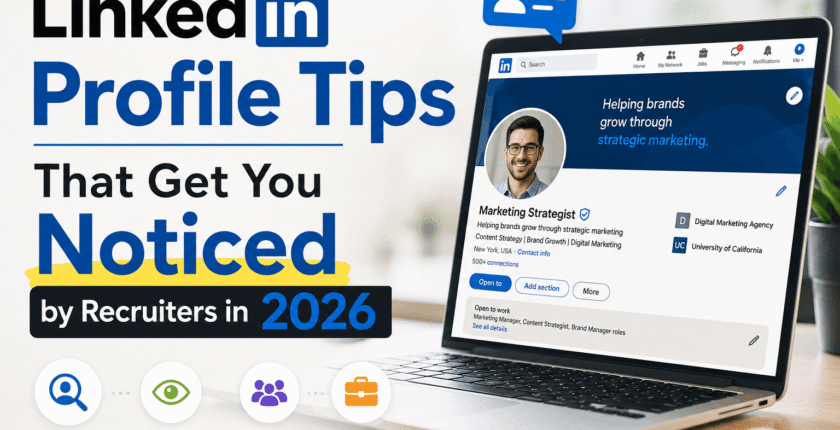
LinkedIn Profile Tips That Get You Noticed by Recruiters in 2026
There were no contacts from any recruiters for me in each of the three preceding months of the year past.
Not one. While my inbox was as silent as could be, a colleague of mine, who had the same job description as me, received up to three LinkedIn messages weekly. As anyone with an iota of obsessiveness in them would do, I analyzed her profile down to the very last detail and compared it to mine.
The jobs were the same. The years of experience were the same. The difference was almost embarrassingly small.
My headline said “Marketing Professional at [Company].” Hers said, “Helping SaaS brands cut customer acquisition cost | Content & Lifecycle Marketing. That’s it. That was most of the gap.
I changed my headline on a Tuesday night. By Friday, I had two profile views from recruiters at companies I actually wanted to work for. That felt like too fast a turnaround to be a coincidence, and after digging into how LinkedIn’s search actually works now, it wasn’t one.
This isn’t a “10x your profile views overnight” post. It’s what actually moved the needle for me and a handful of people I helped afterward, plus what’s changed on LinkedIn itself heading into 2026 that most advice out there hasn’t caught up to yet.
Answered briefly for your convenience
- Don’t use your job title as the basis for your headline.
- Fill out all the sections—LinkedIn’s algorithm loves “All-Stars.”
- Set your Open to Work status options carefully (where, seniority, and remote) and not just the switch.
- Change your skills so that the first three accurately reflect the positions you’re after.
- Post or comment roughly once a week — a dormant profile drops in search rank.
- Forget about “creator mode.” The LinkedIn team took this tool away way back in 2024.
Do just these first two steps, and you’ll be way ahead of the crowd. Here’s why and here’s how to do it.
Why LinkedIn search doesn’t work the way it used to
Here’s the part that surprised me most. Recruiters aren’t typing careful boolean strings into LinkedIn Recruiter as much anymore.
The new feature offered by LinkedIn, which is known as “Hiring Assistant,” an artificial intelligence-powered recruitment assistant, has been launched. It is now widely available and is performing a lot of the behind-the-scenes sourcing work. It basically means that rather than constructing a structured set of keywords, the recruiter is going to be typing in something like “find me a product marketer who has fintech experience and has delivered a pricing page redesign.”
That is good news and bad news. Good, because you don’t need to cram your profile with awkward keyword repetition anymore. Bad, because a vague, generic profile has nothing for that AI matching to latch onto. Semantic search rewards coherence — every section pointing at the same story about who you are.
LinkedIn is still enormous, too. Estimates put it somewhere north of 900 million members worldwide, and most surveys of recruiters—the numbers bounce around depending on who’s asking — put LinkedIn as the primary sourcing tool for somewhere between roughly three-quarters and nine in ten of them, based on recent recruiter usage data. Even at the conservative end of that range, it’s the one platform you can’t afford to half-finish.
The step-by-step stuff that actually matters
1. Fix your photo before anything else
Not a selfie. Not a five-year-old wedding crop. A recently taken portrait that is well-lit, with your face centered and occupying most of the space in the shot.
I took one using the portrait mode of my phone against a plain background and it looked more professional than the “studio” photograph I had previously paid for.
Natural window light does most of the work.
2. Use the banner image as free real estate
Most people leave the default blue background. That’s a wasted strip of space. A simple Canva banner with your specialty or a short value line (“Backend engineer • fintech & payments”) gives visitors context in the two seconds before they decide whether to keep reading.
3. Make your headline sound like a sales pitch rather than just a headline
There are 220 characters to use. Start off with what you deliver or what you specialize in, and not simply “software engineer at X.” Something like:
“Frontend developer building fast, accessible React apps | ex-[Industry] | Open to remote roles”
This one line shows up everywhere—search results, comments, and InMail previews. Don’t waste it.
4. About Section: Personal, Conversational Writing
Don’t write about yourself in the third person. Mention your activities, their benefits, and provide some numbers and examples of your accomplishments, if there are any. Then talk about what you are going to do next.
Bullet points. Line breaks. No one wants to read an endless paragraph on their cell phone. And 80% of LinkedIn viewing is done on a cell phone.
Mine was reviewed by Grammarly afterward, just to clean up any awkward phrasing, and read out loud once to ensure that it wasn’t written in a formal tone.
5. Turn duties into results in your Experience section
“Social media responsibility” is meaningless to a recruiter. “Increased Instagram engagement 40% in six months through the switch to short-form videos” says it all. Don’t have a hard number? Then go with an example of the before and after: “Reduced onboarding process from three weeks to five days.”
6. Be deliberate with skills—order matters
LinkedIn allows you to have a maximum of 100 skills on your resume, but only three will be showcased on your profile, which hold more importance when it comes to search filtering by recruiters. Pick the ones tied to the job you actually want next, and put those first.
Take the free skill assessments for your top two or three if you can. The verified badge is a small trust signal, and it’s an easy way to stand out if you’re earlier in your career and don’t have a long work history to lean on yet.
7. Set Open to Work with actual precision
Turning the toggle on isn’t enough. Go into the settings and specify your target job titles, your preferred locations, and your seniority level. These fields are what filter which recruiter searches you actually show up in.
If you want remote work specifically, list a country or a major hub as your location and put the word “remote” directly in your headline and About section too. Otherwise you’ll quietly get filtered out of remote searches even with the box checked.
You can also choose whether the green “Open to Work” frame is visible to everyone or only to recruiters — worth thinking about if you’re currently employed and don’t want your manager seeing it.
8. Ask for two or three specific recommendations
Don’t say “please write me a recommendation.” Instead, ask a former manager or client who knows about the project that you collaborated on, “Will you write a few words about [the project]?” Specific asks get specific, useful recommendations. Vague questions get one generic line, if you get a reply at all.
9. Show up, don’t just exist
A complete profile that never posts or comments still loses visibility over time. You do not have to be a LinkedIn influencer. All you have to do is post your opinion about a few things on LinkedIn in your region once a week, or just write something about an issue in your industry once a week or every other week.
10. Consider incorporating the video introduction in your resume if you are comfortable on camera.
LinkedIn added a short video introduction feature to profiles, and it’s a low-effort way to show communication skills a static profile can’t. It doesn’t need to be polished — decent lighting, clear audio, thirty seconds on what you do and what you’re looking for.
Quick Before/After
An educational transitioner who is moving from teaching to instructional design had simply “Educator” as her headline. Her About Me section was just two sentences long.
Her new headline was written as “Instructional Designer | Experience teaching to learning and development in corporations | Articulate & Storyline,” and her About me section included three concrete translation examples.
Same experience. Same person. Within two weeks, she had her first recruiter conversation in months. Nothing about her background changed — just how clearly it was communicated.
Mistakes I see (and made) constantly
Trying to “turn on Creator Mode.” It is non-existent now. LinkedIn incorporated it in all profiles as far back as 2024 and removed the on/off switch quietly from the Resources section. If any article suggests that you should turn it on, the article is out of date.
Headline stuffed with keywords. These terms are keywords and not any personal name: Marketing | SEO | Content | Growth | Strategy | Analytics. Make your choice.
A profile photo from a different decade. People notice the mismatch in an interview. Update it.
Connecting with a blank request. A one-line note like “Hi, I saw we’re both in fintech marketing — would love to connect” gets accepted far more than a silent request.
Letting the profile go stale. If your last post is from two years ago and your current job title is still your job two roles back, that’s the first thing a recruiter notices, and not in a good way.
Ignoring mobile formatting. Uninterrupted paragraphs that may seem okay on the computer screen appear as a huge block of text when seen on a mobile phone screen, where most reading happens.
A few honest caveats
None of this guarantees a job offer, and I’d be skeptical of anyone who promises that. A great profile gets you found and gets you a fairer first impression. The interview and the work still have to hold up their end.
It’s also worth pairing your profile work with a resume that actually matches the keywords in the job description—I’ve got a separate breakdown on resume keywords that beat ATS bots that works well alongside this. And if you’re specifically hunting remote roles, my rundown of where remote jobs actually get posted in 2026 is worth a look too.
Now, a quick FAQ
Does LinkedIn still have the Creator Mode option in 2026? Not anymore. LinkedIn deleted the button in 2024, when it became apparent that the tools (analytics, follow button, and featured content) already existed in each profile and therefore required no turning on.
How often should I be posting to remain visible to recruiters? Approximately once a week, or even several times a week if writing posts isn’t for you. Quality over quantity is what really counts.
Is “Open to Work” an app that can be used by me if I am working right now? Only if you ensure that the app is private, only accessible to recruiters; otherwise, you will get listed in search results with a green circle badge beside your name.
Is “Open to Work” an app that can be used by me if I am working right now? Only if you ensure that the app is private, only accessible to recruiters; otherwise, you will get listed in search results with a green circle badge beside your name.
Final thoughts
I still think about that three-month stretch of silence sometimes. Not because it was dramatic — it wasn’t — but because the fix was so small compared to the problem it caused.
Most people don’t have a resume problem or an experience problem. They have a “nobody can tell what I actually do” problem, sitting right there on a profile they haven’t touched since they took the job they’re now trying to leave.
Give yours an hour this weekend. Start with the headline. See what happens.